A
Anonymizer or Anonymous Proxy
An “anonymizer” (also called an “anonymous proxy”) is a tool that makes your internet navigation untraceable. It is a proxy server that acts as an intermediary between a client computer and the rest of the Internet. Anonymizer servers are located on the Internet at a location that is not traceable to you.
Every machine connected to the Internet has a unique IP address. When you surf the web the anonymizer accesses the Internet on your behalf, without providing your computer’s identifying information – the IP address, information about your location, and other personal information.
Anonymizers can serve malicious purposes by protecting users’ identities when they use the Internet to promote defamatory statements or cyberbully others.
Some users (your kids included!) may try to use an anonymizer to bypass web filters, but PureSight Owl blocks them so your children will not be able to override PureSight and expose themselves to inappropriate content or online harrassment.
Anonymous Messenger apps
Anonymous Messenger apps are social-media apps that mask users’ identities and can create messages that self-destruct. These are becoming very popular among youths as they leave Facebook and seek more fun, less accountability, ephemerality, (ephemeral = lasting for a very short time) and more privacy online. However, these anonymous apps create the opportunity for bullying and cruelty in a forum where they cannot be tracked.
Some of the more popular ones are Yik Yak, Backchat, Backdoor, Kik, Blink, Whisper, Secret, Telegram, Snapchat, Wickr, and Ask.fm

App
A small software application that can be downloaded to a Smartphone. Thousands of apps are released all the time, and they are popular with users of Smartphones such as the Apple iPhone and the Google Android phone. Most cost very little and some are free.
Examples of apps: song identification software, restaurant reviews, games, language translators.

iPhone App Store
B
Blog or Online Journal
A contraction of the term weblog, blogs or online journals are Web sites that are frequently updated with new content or “posts”. Blogs are very easy to create and update. The posts are usually displayed in reverse chronological order with the latest displayed at the top. Readers can post replies or make comments to each post.
There are several types of blogs:
- Personal blogs: maintained by a single person and may focus on the daily life of the writer or that individual’s viewpoint on a subject or subjects
- Corporate blogs: written by companies. Used to help a company communicate better with its customers or communicate internally within the organization.
- Journalistic blogs: typically written by journalists, these blogs undergo editorial supervision, so they are not entirely personal, but they are also not corporate and reflect a single person’s opinion.
Kids will often use blogs to relate what is happening in their lives – school, after school activities, their social life. As with online profiles, blogs and online journals need to be monitored to make sure the child is not giving out too much information. Some blogs or online journals contain personal details such as full name, address, telephone number, name of school, etc. This information can be found and displayed by search engines.
See Blogs in Plain English
Browser
An application that allows you to view and interact with websites. Popular web browsers include: Chrome, Internet Explorer (IE), Firefox and Safari. Some browsers offer faster downloads or better security than others but it is mostly a matter of personal choice.
C
Chat Room
Chat rooms are “meeting places” on the Internet where you can have live, real-time conversations with many people from all over the world, at the same time. Chat rooms are usually intended for people who share similar interests, such as comics, gardening or pets.
Everyone in the chat room can see what everyone else writes, but you, or your children for that matter, can still use an anonymous alias. While this anonymity can protect your children’s real identities and encourage them to have open conversations, it can also serve to hide the true identity of predators trying to contact young people in order to goad them to talking about intimate subjects, or even worse, to meeting with them in person.
For this reason children should be taught to treat chat rooms with caution. Younger children should not be allowed to be there, and older children should only be allowed to participate when supervised by an adult. All children should understand the basic safety rules for chats: don’t reveal personal information, stay in the chat room’s public area, and never agree to meet anyone they meet in a chat room in person without informing their parents.
So, what’s the difference between a chat room and a forum?
Whereas members in a chat room usually all chat or communicate at the same time, members in an Internet forum post messages to be read by others whenever they log on. Internet forums also tend to be more topic-focused than chat rooms.
Chat Roulette
Chat Roulette is a relatively new Internet phenomenon, where users are paired with a random videochat partner. Users can click “next” any time, or decide to stay with their current chat partner. Most Chat Roulette exchanges last only a few seconds. Chat Roulette is probably the first chat that randomly pairs users from all over the world, to have introduced video to the experience.
Although Chat Roulette’s rules are: 16+, Please stay clothed and Please use “Report” button to get bad stuff blocked, the user is basically chatting with, and looking at, a complete stranger. And that stranger can often choose to do some very strange, deviant or offensive things.
See also:
Cloud Computing
Cloud computing is a type of computing in which advanced software applications and services are performed on servers via the internet, rather than installed on local servers or personal computers. In more simple terms, your software (or service) is online and ‘borrowed’, instead of purchased and actually installed on your computer. The name cloud computing was inspired by the cloud symbol that often represents the Internet in flowcharts and diagrams.
A prevalent example of cloud computing is web- based email, such as Gmail – the users’ email is all stored and accessed ‘in the cloud’ of the Internet, and not actually on their own computer. Other examples are backup services, social networking and more.

Contact / Contact List
On Instant Messaging programs or social networks, a contact is another user of the same program that you have approved as your “friend” and have added to your contacts list.
Once you have added someone to your contacts list they can see when you are online, check out your profile and whatever personal information you have posted there, including images, and, in turn, you can look at their personal info. This is why you should be very selective of who you add to your contacts list. It is advised that you only add people that you know in the “real world” and not someone that you’ve only met online. You are also able to chat freely with anyone on your contacts list.
It is important to remember that a contact’s name or information can be entirely false, so this type of information should be treated with caution. Someone posing as a 14 year-old teenage girl can in actuality be a 45 year old male.
So, if you are receiving communication from one of your contacts that makes you feel uncomfortable in any way, you always have the option of removing or deleting that contact from your contacts list. In instant messaging programs you can also block that person entirely. A contact that has been blocked will not see whether or not you are online and will not be able to communicate with you.
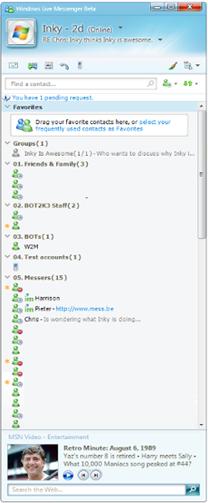
Windows Live Messenger contact list
D
Domain
A domain is a meaningful, easy-to-recognize address for computers and information on the Internet. Domain names typically end with a suffix that stands for the type or contentPageTitle of a resource (for instance, “.com” for commercial resources or “.uk” for resources based in the United Kingdom).
Domain names are often confused with URLs. The domain name is only part of the address – the overall Web site identifier and the URL is the locator for a particular resource on the Internet, or the complete Internet address. It must include information to the left of the domain name, identifying the correct Internet protocol. These are some common protocol identifiers: http://, ftp://, news: and mail:.
The domain name for this web site is: puresight.com
The URL for this web site is: http://www.puresight.com
For example, the page that describes the PureSight Company can be found at the following URL: http://www.puresight.com/company/about-us.html.
If you type in www.puresight.com or even puresight.com, modern browsers will guess that you meant http://www.puresight.com but it is important to understand that the correct form of the URL is longer, and that not all web sites include www as part of their address. Some might be in the form http://home.puresight.com, or even just http://puresight.com.
E
E-mail message
E-mail stands for electronic mail. E-mail messages are simply letters or notes that you exchange with someone else. In a business setting it is used as a readily available, immediate, efficient form of communication. In a family or social setting it is a fast, convenient, inexpensive way to stay in touch with friends and family. Sending and receiving e-mail is one of the most popular uses of the Internet.
An e-mail message can be a basic textual message and may also include images or movies, either as attachments, or embedded in the e-mail message itself, and viewed in the body of the message. E-mail messages can also include hyperlinks that direct you to a Web site, picture, movie, or even content that would be harmful to your computer. Links within an e-mail message can be dangerous and should always be treated with caution.
One of the problems of e-mail is the amounts of unsolicited spam, or junk e-mail, which are received by e-mail recipients, much of it offensive or obscene. Although most of these are blocked by spam filters, kids, who may not think critically about the messages they receive, can be particularly vulnerable to ads, and scams. Cyber bullying may also be a serious issue – cyber bullies (more often than not – other kids they know) can send offensive, disturbing and insulting messages to your kids.
For younger kids it is recommended that parents set up a shared e-mail account for them so they can monitor their messages. Young children should be instructed never to share their e-mail address with anyone they don’t know. Older kids who already have their own email accounts should be instructed on setting up filters to avoid receiving unwanted messages.
F
Facebook
Facebook is a social networking website that was founded in 2004 and is operated and privately owned by Facebook, Inc. Registered users can create personal profiles, upload photos, add friends and send them messages, and notify friends about themselves by updating their own profiles or their status.
Users can:
- Update their status regularly with any information they wish to share
- Join networks organized by city, workplace, school, or region
- Create events, that can be either offline or online events, and register to participate in other events
- Chat with other users who are online at the same time using an instant messaging chat utility.
It is important to note that Facebook includes tools to control the information users share and with whom they choose to share it – starting with only those who are the user’s approved friends (contacts) and up to anyone who performs a simple search on the web.
The Facebook mission
According to the Facebook website “Facebook’s mission is to give people the power to share and make the world more open and connected. Millions of people use Facebook everyday to keep up with friends, upload an unlimited number of photos, share links and videos, and learn more about the people they meet”.
A January 2010 survey ranks Facebook as the most popular social networking site.
Some interesting statistics, as published by Facebook
- One billion monthly active users as of October 2012
- 584 million daily active users on average in September 2012
- 604 million monthly active users who used Facebook mobile products as of September 30, 2012
Facebook fact sheet: http://www.facebook.com/press/info.php?factsheet
File
A computer file is a block of information which is available to a computer program. The file name is made up of:
- The name of the file, which is any name whoever creates the file chooses to give
- An extension that indicates what type of program is needed to be able to read and/or display the contents of the file. For example: myfile.docx, mypic.jpg.
Some common file types are:
- Text File: Words or words and pictures. (.txt, .docx are some extension examples)
- Image File: These are all different formats to display a picture or movie.( .bmp, .jpg, .mpg, gif.)
- Audio File: This can be a sound file or one containing a song or entire album of songs(.mp3)
File Sharing
File-sharing, also known as “peer-to-peer” (P2P) technology, allows users to search for and download files from other users’ computers. This technology is popularly used to exchange music files or video files of TV shows and movies.
There are many free P2P software “client” programs available that enable this kind of file sharing. Some popular examples are: Lime Wire, UTorrent, EMule and others.
The dangers of file sharing
There a few issues related to file sharing that parents should be aware of:
- Exposure to pornography: As many people use these networks to trade pornographic images and videos, and this medium is not regulated or monitored, kids can easily chance upon sexually explicit materials, even when performing innocent searches
- Spyware/adware: While file sharing programs are obtainable free online, they may come with additional software known as “spyware,” or “adware”, that can track where you go on the Internet, create links on Web pages that will send you to advertising and even collect information from your hard drive such as passwords, credit card numbers and email addresses
- The ethical issue: Although many people download files and some musicians even support the practice, file-sharing is illegal. If everyone downloads for free, artists will not be compensated when their songs are exchanged online, and funds may not be available to develop and promote new artists.
Forum
An Internet forum is an online discussion site, where members can communicate with other members. A member of a forum posts a message, which is visible to all other forum members, who have the option of posting a reply, which is also visible to all members. Thus, a discussion can build up without all users having to be online at the same time.
Before a prospective member joins a forum, he or she is usually required to register, to create an online identity (ID or nickname) to be used on the forum and also to agree to follow certain online rules. It is recommended that you read these rules and see if the forum is appropriate for your kids. You will also be able to see who to contact in case of a complaint. A forum can focus on nearly any subject and forum members tend to develop a sense of an online community.
The separate conversations in an Internet forum are called threads. An Internet forum administrator or monitor may also participate in the forum. A forum administrator can usually modify threads , move or delete them if necessary. Administrators can also usually change software items in an Internet forum. Moderators make sure the forum rules are being followed. It is also important to note that some forums control messages before they are published, while in others the moderators will remove offensive messages only after they have been published. Until that happens, the offensive message is up there for everyone to see.
An Internet forum is also called a message board, discussion group, bulletin board or web forum.
So, what’s the difference between an Internet forum and a chat room?
Whereas members in a chat room usually all chat or communicate at the same time, members in an Internet forum post messag
H
HTML
The term HTML stands for Hypertext Markup Language – the programming language that web pages are based on. HTML commands your web browser to display text and graphics. HTML uses commands called ‘HTML tags’.
I
ICQ
ICQ (homophone for the phrase ‘I Seek You’) is a popular instant messaging program, which was first developed by the Israeli company Mirabilis, and is now owned by AOL.
ICQ features include sending text messages, multi-user chats, free daily-limited SMS sending, resumable file transfers, greeting cards, multiplayer games and a searchable user directory. In order to use ICQ, both parties must download the program.
An interesting phenomenon associated with ICQ and other instant messaging programs is the development of an entire new written language of communication that includes abbreviations (BRB= be right back), substitution of graphics for letters or words (<3 = heart or love) or letters that sound like words (4 sure = for sure).
See here for a glossary of shorthand definitions.
ICQ assigns a unique identification number (UIN) to each user, rather than using the user’s email or an identity chosen by the user, as other similar programs do. This allows an ICQ user to change every piece of information about their account — screen name, email address, real name, home town — and still have the same primary identification.
It is important to remember that a contact’s name or information can be entirely false, so this type of information should be treated with caution. Someone posing as a 14 year-old teenage girl can in actuality be a 45 year old male.
ICQ is no longer the leading messaging program as it was in the past and has now been surpassed by more popular messaging programs such as MSN (Windows Live) Messenger, Google Talk and Facebook’s chat.
ICQ claims to have over 180 million users in more than 245 countries.
Instant Message
An instant message is a private online communication between two people using the same instant messaging software. The software can come either in the form of a client that needs to be downloaded to your computer or can be accessed online using dedicated Web messengers.
Instant messaging (IM) may be the most popular way of talking with friends among young people as it is a cost-free tool for communicating with friends, both near and far, and only the intended recipient can read the message. It often replaces the telephone as a means of communication. Some of the more popular IM programs are Windows Live Messenger, ICQ, and Yahoo Messenger. There are many others.
IM users can select the people they want to talk with and they create contact lists of friends. They can chat only with their “friends”. Users also have the option of blocking people they don’t know or don’t want to communicate with. It is important to remember that a contact’s name or information can be entirely false, so this type of information should be treated with caution. Someone posing as a 14 year-old teenage girl can in actuality be a 45 year old male. Cyber bullying may also be a serious issue – cyber bullies (more often than not – other kids they know) can send offensive, disturbing and insulting messages to your kids. So it is important that children exercise caution and make sure they “approve” as friends only people they know.
Because it is sometimes easier to say things online, rather than in person, instant messaging can be used to spread rumors and gossip and cyberbulllying is a real danger.
Internet
The Internet is a linking of computer networks – all the hardware and software that connects millions of computers, all over the world, to each another. This connection makes it possible for anyone with access to the Internet to visit, chat, or speak with anyone else connected to the Internet. There are lot of services available over this network of computers – the World Wide Web, e-mail, file transferring services and others.
ISP
ISP stands for Internet Service Provider – the company that provides you with an internet connection usually for a fixed monthly fee. The fee may depend on the connection speed (e.g. ultra high speed Internet vs economy Internet). ISPs may also offer varying services for additional fees such as: email, hosting your own web page, hosting your own blog, antivirus and online child protection.
WISPs are Wireless Internet Service Providers.
K
Keyword
In simple terms, a keyword is a significant or descriptive word, or phrase. Keywords serve to describe the content of a specific website or web page and they have many uses. We use them to perform searches by entering them into a search engine in an effort to get relevant results in return.
In PureSight PC’s Instant Messaging filter, keywords are used to prevent your children from disclosing information that could be potentially dangerous, such as their phone number or your credit card number. All you have to do is enter the relevant keywords and the content will be blocked or you will be alerted according to what you have defined in the system.
M
MSN Messenger
See Windows Live Messenger
Meme
A “meme” is a virally-transmitted cultural symbol, belief, or social idea. Historically, a meme was a cultural item – a story, fable or joke, that would be transmitted via word of mouth. Today, memes travel as fast as it takes to hit “Like”, “Share”, “Retweet” or post a blog. A meme can be anything from a link to a YouTube video to an email signature that includes a famous quote
The term “meme” was introduced in 1976 by the evolutionary biologist, Richard Dawkins who described memes as a form of cultural propagation, a way for people to transmit social memories and cultural ideas to each other. A meme idea will travel from mind to mind, in a way that is similar to the way that DNA and life will spread from location to location.
Memes that become viral usually have the following features:
Meme content:
Most memes are spread by adolescents and young
people – who like to message and interact online,
and enjoy memes.

Lolcat meme
MySpace
MySpace is the second most popular(as of January 2010) social networking website, after Facebook. The site was launched in January 2004, and was originally designed to be a file sharing site but quickly became a public social networking tool. MySpace offers free accounts to anyone who meets specific age requirements and aims mostly at a younger membership. The bandwidth and storage space is largely paid for by ads that are featured on the main site.
A MySpace profile typically includes an image and in-depth personal information. The amount of detail included in the profile is up to the user and is submitted voluntarily. MySpace has tools that allow people to upload pictures, videos, links to other websites and even music. Once a person creates his MySpace page, he can add friends, and then friends’ friends and so forth. Friends can send a blog to friends who subscribe to their MySpace blog, or they can post bulletins for everyone on the Friend List to see.
MySpace is used heavily by Independent filmmakers and even mainstream musicians to promote their work.
MySpace has an Amber Alert tool that creates a pop-up whenever an Amber Alert is activated in your general area. By pressing the pop-up button, the Amber Alert message displays, letting the user know all the information that authorities think people should know about recently missing children.
According to MySpace:
- MySpace has more than 100 million monthly active users around the globe
- MySpace has nearly 65 million total unique users in the US
MySpace Fact Sheet: http://www.myspace.com/pressroom?url=/fact+sheet/
P
P2P
P2P stands for “Peer to Peer”. P2P is a protocol that runs on a personal computer and allows sharing of files, such as music, video or data files, with other users across the internet. P2P networks work by connecting individual computers together, relying on the computing power and bandwidth of the users of the network to share files instead of having to go through a central server. See file sharing.
Post
A post is a single entry in a blog; a blog contains multiple posts. To post means to publish new content; “I’ll post the news on the bulletin board”.
Profile
A profile is personal information that the author is willing to share on applications such as social networks or instant messaging programs. It is important to remember that anyone using the Internet may be able to see the information in any user’s profile.
Information such as your full name, your address, school name, and telephone number can be dangerous to include in a profile. This type of information may lead to unwanted contacts or stalking. Information such as the full name and date of birth may increase children’s risk of being victimized by online predators.
In order to protect your personal information it is advised not to provide too much personal information and to make sure your privacy settings are set so that only your approved friends will be able to see your private information.
It is important to remember that a user’s name or information can be entirely false, so this type of information should be treated with caution. Someone posing as a 14 year-old teenage girl can in actuality be a 45 year old male. Other profiles can represent a non existing person altogether.
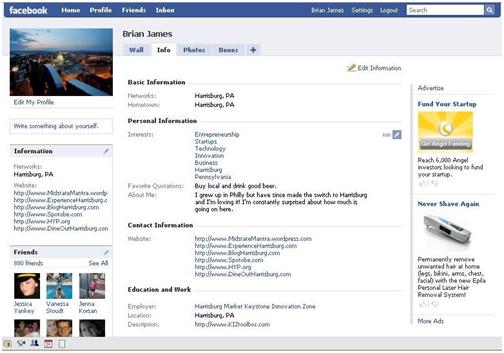
Example of a Facebook profile.
Proxy
In simple terms a proxy is an intermediate server or a network that enables indirect communication between computer networks. In some cases the proxy server serves as a separation point between an organization and the outside world and enables monitoring, blocking or changes in HTML pages based on different criteria.
A proxy server enables the blocking of web pages with undesirable content and access to illegal downloads.
The anonymous proxy enables privacy and anonymity, by replacing the IP address of a user on the internal (protected) network with its own IP address for all traffic passing through it.
The proxy provides the same ability to browse the Internet as any other Web browser. A proxy site allows the user to type in a specific web address and be directed to that specific page in a window.
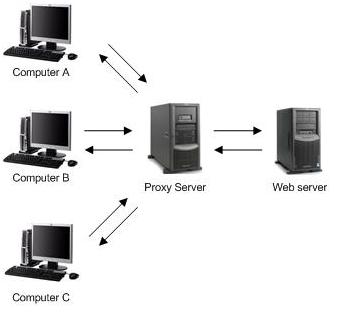
Example of how a proxy server works.
S
Second Life
Second Life is an online three dimensional virtual world that is created entirely by its members. Members assume an identity, take up residence in Second Life (and thus become “residents”), and create an imaginary character to represent them. The character (or “avatar”) moves about in the virtual world using mouse and keyboard controls and interacts with other residents. Residents can also trade virtual property and services with one another, or travel throughout the world (“the grid”). Second Life’s virtual world also includes sound, built-in chat and instant messaging.
Residents have reported making significant “real world” incomes by selling objects or services that other residents want on Second Life. The currency used in Second Life is called Linden dollars and it can be purchased with real dollars, or acquired from other residents in exchange for services or products.
Real world corporations and even countries take interest in Second Life. Real world banking, corporate training classes, virtual universities, virtual interactive congressional sessions, and three-dimensional customer and tech support are just some of the possibilities that corporations and businesses have started to think about.
Second Life is for people aged 18 and over, while Teen Second Life is for people aged 13 to 17.Within the adult version of Second Life, there are PG areas and adult areas. According to the terms of service contract, harassment of any kind in Second Life results in permanent expulsion.
According to Second Life:
- Second Life is the virtual world leader with 90% of the market
- If Second Life was a physical place, it would cover 1.8 billion square meters of land which is about the size of Houston, Texas
- Over $360 million USD in user-to-user transactions in 2009
See: What is Second Life? From the Second Life Website.
Selfie
A self-portrait photograph, typically taken with a hand-held digital camera or smartphone. Selfies are often associated with social networking sites such as MySpace, Facebook, and Instagram, where they are often posted. They are usually casual, and may include sexually explicit photos.
Slut-Shaming
Slut-shaming, is the act of making someone, usually a woman, feel guilty or inferior, for being sexual, having several sexual partners, acknowledging sexual feelings, and/or acting on sexual feelings. Slut-shaming has been called “the new scarlet letter” and is harmful not only to the girls and women targeted, but to women in general. Slut-shaming can occur even if the term “slut” itself is not used.
A related term is teen shaming which refers to teens posting images of other teens with derogatory comments written on those pictures.
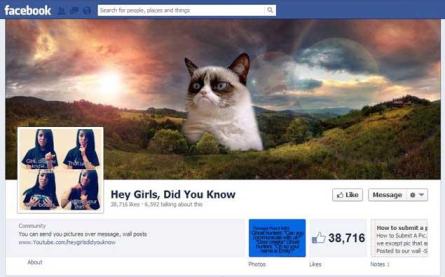
Many of the insulting memes are compiled
on a Facebook page, “Hey Girls, Did You Know?”
Smart Phone
A Smartphone is a device that lets you make telephone calls but also has additional features making it, in effect, a handheld computer. The Smartphone offers advanced computing capabilities such as high speed web access, the ability to install software or Apps , the ability to send and receive e-mail, edit Office documents or social networking.
Smartphones are based on an operating system that allows them to run the applications: Apple’s iPhone runs the iOS, other devices run Google’s Android OS, and Microsoft’s Windows Phone. Smartphones generally have more memory and a touch screen or a small keypad.
Kids who use Smartphones are exposed to dangers similar to those experienced by kids who use Personal Computers – sexting, cyberbullying and exposure to questionable or harmful content such as Pornography, violence and hate.
Snapchat
A photo messaging application where users can take photos, record videos, add text and drawings, and send them to other users. Users set a time limit for how long recipients can view their Snaps, ranging from up to 10 seconds to as little as 1 second, after which they will be hidden from the recipient’s device and deleted from the company’s servers. As it is considered “safe” kids often send their sexually explicit images in Snapchat, so that it has become associated with sexting.

Snapchat logo
Social Network
A social network is a Web site that allows users to connect with friends and family, share photos, videos, music and other personal information with either a select group of friends or a wider group of people, depending on the selected settings. Social networking Web sites function like an online community of Internet users. Each user creates their own profile where they publish personal information and photos and each user can decide which other registered users of the social network will join their list of friends, or contacts.
Using privacy settings they can also decide who will be able to see the information they publish –starting with only those they’ve approved as friends and up to anyone who is part of the social network.
The potential dangers of social networks
Social networks can be misused by children to cyber bully other children, to spread rumors or gossip. This can cause great harm to the victim, mental or otherwise even though the intention may not have been inherently malicious.
In addition, kids or anyone who has a profile on a social network should be taught to exercise caution with the personal information they publish on their profiles. This information can be used by people with bad intentions to track them down. For this reason they should also be instructed about using the site’s privacy settings.
Some popular social networks are Facebook, MySpace and Bebo.
See Social Networking in Plain English.
Spam
Spam is unsolicited commercial e-mail, generally e-mail advertising for some product, sent directly to individual users on a mailing list or newsgroup. It is also known as “bulk e-mail”, or “junk e-mail”.
The term is generally attributed to the Monty Python song, “Spam spam spam spam, spam spam spam spam, lovely spam, wonderful spam…” Like the song, spam is an endless repetition of worthless text. Others claim the source is the University of Southern California’s computer lab who named it so because it has similar characteristics as the lunchmeat Spam:
- Nobody wants it or ever asks for it
- No one ever eats it; it is the first item to be pushed to the side when eating the entree
- Sometimes it is actually tasty, like 1% of junk mail that is really useful to some people.
Spam wastes people’s time with unwanted e-mail, but also takes up a lot of network bandwidth, as many copies of the same message are sent. As a result, many organizations are trying to fight spam and some online services have introduced policies to prevent spammers from sending unsolicited messages to their subscribers.
T
Talkback
A Talkback is a system that allows readers to respond to information published on the Internet. It is commonly used on news sites, blogs, and other sites that enable readers to post their reaction to the information on a certain Web page. The talkbacks appear at the bottom of the page, with the latest message usually at the top. Readers can even post comments to other people’s comments. The Talkback is typical of Web 2.0 culture, and usually serves to express the writer’s opinion but can also serve to point out factual or language mistakes.
Although originally intended for “legitimate” readers to post their reactions, there are several issues to pay attention to:
- Offensive and/or violent language. Similarly to forums, some Web sites will control these messages before they are published, while in others offensive messages will be removed by the site’s editors only after they have been published. Until that happens, the message is up there for everyone to see. Some Web sites do not bother to monitor these messages at all
- False identity: as Talkbacks are anonymous you can never know who the real writer is
- Misrepresentation: Talkbacks are often viewed as an instrument for influencing public opinion and for advancing causes and so they will be used by PR firms or other organizations to advance the interests of whoever they represent. The readers cannot know who is really behind the message.
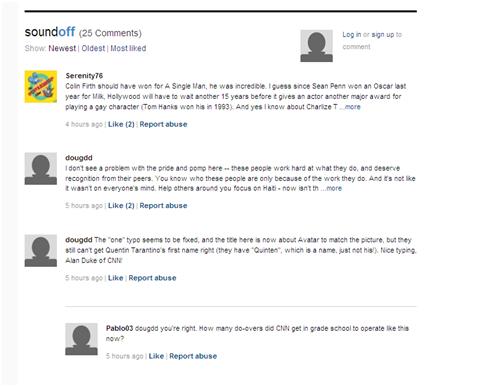
Typical talkback
Twitter
Twitter is a free social networking and micro-blogging service that allows its users to send and read other users’ updates, known as “tweets”. Tweets are text-based posts up to 140 characters long that answer the question “what are you doing?”. Tweets are displayed on the user’s profile page and delivered to other users who have signed up to receive them, known as followers.
The tweet is defined by its short informal format. As the tweets are limited to 140 characters a special shorthand has developed. For example, the # symbol (hashtag) is a way to group tweets by keyword. URLs are shortened so that they take up fewer characters. Click here for a run through on Twitter lingo.
The sender can restrict delivery to friends (the default is delivery to everyone). Users can receive updates via the Twitter website, SMS, RSS, email or through an application such as Tweetie, TwitterFon, Twitterrific, Feedalizr or Facebook.
Twitter has many personal and business uses. It’s a great way to keep in touch with your friends and quickly broadcast information about where you are and what you’re up to, without going to the trouble of creating an entire blog post. For business, Twitter can be used to broadcast a company’s latest news and blog posts, interact with customers, or to enable easy internal collaboration and group communication.
See: Twitter in Plain English.
U
URL
In very simple terms a URL is the address of a web page on the World Wide Web, the name or numbers that appear in the address window of your browser. The acronym URL stands for Uniform Resource Locator.
URLs are often confused with domain names. The domain name is the overall web site identifier and the URL is the locator for a particular resource on the Internet, or the complete Internet address. It must include information to the left of the domain name, identifying the correct Internet protocol. These are some common protocol identifiers: http://, ftp://, news: and mail:.
The domain name for this web site is: puresight.com
The URL for this web site is: https://www.puresight.com
For example, the page that describes the PureSight Company can be found at the following URL: https://www.puresight.com/about/
If you type in www.puresight.com or even puresight.com, modern browsers will guess that you meant https://www.puresight.com but it is important to understand that the correct form of the URL is longer, and that not all web sites include www as part of their address. Some might be in the form http://home.puresight.com , or even just https://puresight.com.
W
Web 2.0
Web 2.0 is the term given to describe a second generation of the World Wide Web that is focused on the ability for people to collaborate and share information interactively online. The term essentially refers to the transition from static HTML Web pages (also known as Web 1.0) to a more dynamic Web that is more organized and is based on serving Web applications to users.
It is important to understand that the term Web 2.0 does not necessarily refer to any specific change in the technology of the Internet, but rather to the behavior of how people use the Internet. A Web 2.0 site allows its users to interact with other users or to change website content, in contrast to non-interactive websites where users are limited to the passive viewing of information that is provided to them.
Examples of Web 2.0 include blogs, wikis, online presentation tools, online photograph-sharing sites like Flickr, social networking sites and many, many more.
For a more detailed explanation see: What is web 2.0?
Web page
A Web page is a document, typically written in HTML and viewable by anyone connected to the Internet with a Web browser. The document is almost always accessible via HTTP, a protocol that transfers information from the Web server to display in the user’s Web browser. This information in the document may include navigation to other webpages via hypertext links.
Web site
A Web site consists of a “page”, or a collection of pages, containing text, pictures, links for downloading games, music or software and sound and video clips. Web sites can be news sites, educational sites, online stores, blogs (online diaries) and there are many other types of Web sites.
There are literally millions of sites on the Web, which can be accessed using a Web “browser.” Some popular web browsers are Internet Explorer, Firefox, or Chrome. Your kids can enjoy a variety of entertaining and educational websites but there are also numerous Web sites containing pornography, hate, violence and illegal and dangerous content and activities. Online child safety solutions such as PureSight PC can help you protect your children by blocking undesirable content.
One of the dangers on the Web is the danger of violation of your children’s privacy either from commercial sites that ask for personal information, or when kids themselves post personal information or photos online.
With millions of pages already published, and thousands more being posted every day, finding accurate online information can be a difficult task. Since anyone can publish their views online, the Web contains a great deal of inaccurate and misleading information. Studies show that young people tend to believe that what they see online is true, so it’s important to teach your kids to question what they read online.
Windows Live Messenger
Windows Live Messenger (formerly MSN Messenger) was a popular instant messaging program created by Microsoft. The program was originally released as MSN Messenger in 1999 and as Windows Live Messenger in 2005.
Registered users create a profile with personal information and a contacts list of approved friends (other registered users of the program) with whom they can chat when both parties are online. Kids use it as an easy to use, free, and convenient communication tool and in some instances it has replaced the telephone. Although much of the communication is innocent and serves social purposes, cyberbulllying can be a serious issue with kids sending offensive and insulting messages in order to bully other kids. It is important to remember that a contact’s name or information can be entirely false, so this type of information should be treated with caution. Someone posing as a 14 year-old teenage girl can in actuality be a 45 year old male.
Another interesting phenomenon associated with Windows Live Messenger and other instant messaging programs is the development of an entire new written language of communication that includes abbreviations (BRB= be right back), substitution of graphics for letters or words (<3 = heart or love) or letters that sound like words (4 sure = for sure). See here for a glossary of shorthand definitions.
Besides online chatting and instant messaging Windows Live Messenger offers the following additional features: photo sharing, sharing folders, PC-to-phone calls, offline messaging, games and applications and others.
Windows Live Messenger has been discontinued and replaced by Skype.
Wi-Fi
WiFi (short for “wireless fidelity”) is used for connecting devices like PCs and Smartphones to the internet without wires, through a wireless network. Wi-Fi technology is becoming popular as an alternative to a wired LAN at the home or in the office.
The WiFi signal can reach a few close rooms and up to several hundred meters. Many restaurants, airports and other public places offer Wi-Fi free of charge to their customers.

Y
YouTube
YouTube is a video sharing website where users can upload, view and share video clips. Everyone can watch videos on YouTube, and you do not need to be a registered user to do so, but registered users can upload and share an unlimited number of videos, save favorites, create playlists, and comment on videos. The YouTube service is free and is supported by advertising.
YouTube was created in February 2005 and bought by Google Inc In November 2006, and is now operated as an independent subsidiary of Google.
YouTube uses Adobe Flash Video technology to display a wide variety of user-generated video content, including movie clips, TV clips and music videos, as well as amateur content such as video blogging and short original videos. Most of the content on YouTube has been uploaded by members of the public, although media organizations including CBS and the BBC offer some of their material via the site.
Although YouTube prohibits the distribution of pornography, much questionable content is available on the site, where it can be easily accessed by anyone. In addition, YouTube has become a semi-forum as videos that are published raise comments from registered users. Some of these can include inappropriate or violent language.
YouTube’s features include:
- Video embedding: Users can insert a YouTube video into Facebook and MySpace accounts, blogs, or other Web sites where anyone can watch them
- Public or private videos: Users can select whether they want to broadcast their videos publicly or share them privately with friends and family
- Subscriptions: Users are able to keep track of their favorite users’ new videos
- Record from Webcam: Users with a webcam and Flash software are able to directly record video responses or normal videos onto the site rather than having to prerecord and then upload the video
According to YouTube:
- Over 800 million unique users visit YouTube each month
- Over 3 billion hours of video are watched each month on YouTube
- 72 hours of video are uploaded to YouTube every minute
- 100 million people take a social action on YouTube (likes, shares, comments, etc) every week